Drupal 7 Tutorial: Creating Edit Content links in Views
by Dan Linn, Front-End Architect / Fun Master
Update: Use this module
Old Method: Views can be very handy, but the views interface can be a little tricky. A question that comes up when training clients is "Why can't I edit this content?" when they are looking at a view. If you use the node row style Views will add them for you, but not if you're using the field style. You can surely explain how views work (results may vary depending on the client), but an even easier method is to create edit links that link directly to your content items. Using this method creates a handy little gear button when you roll over the content, with a link that says "Edit Content" when you click on it.
The latest version of views for Drupal 7 has revamped the UI. I'll be using this version in the examples, but the same technique can still be used in the old UI.
Step 1: Add the Edit Link field to your view
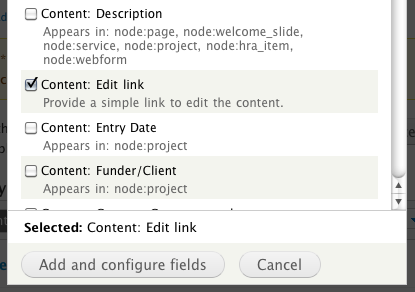
- In the latest version of Views this field is called "
Content: Edit Link". In the previous versions it was "Node: Edit Link" - Click
Addunder Fields and select theEdit Link

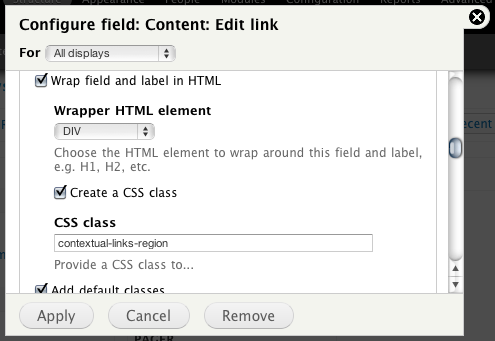
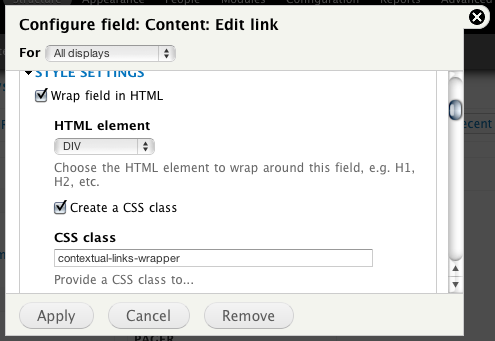
Step 2: Add the wrappers and classes
- Add a
divwrapper to the entire field and label, and give it the class name ofcontextual-links-region. - Add a
divwrapper to the field itself and give it a class name ofcontextual-links-wrapper


Step 3: Rewrite the Field
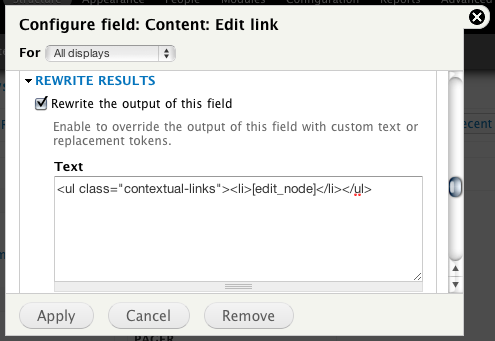
- Check the "
Rewrite the output of this field" checkbox and enter this into the box:<ul class="contextual-links"><li>[edit_node]</li></ul>. This adds the actual list and list elements and uses the token of the field itself.

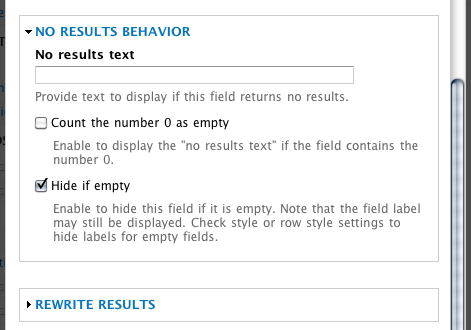
Step 4: Hide if empty
- Check the "
Hide if Empty" checkbox.

Step 5: Add styles
- Make sure this new link doesn't interfere with other links. I usually add
top:15;to the style of the links to ensure it doesn't mess with the "Edit View" link. - Change the gear color. Now that you have this fancy button on every little content item, you may get some instances where the little grey gear is hard to see.
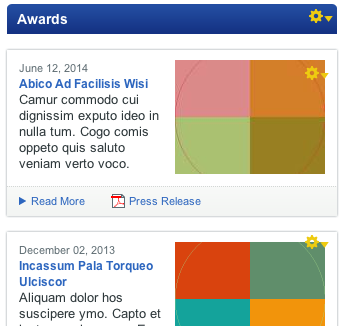
You can now see the gear button when hovering over the view. In a perfect world, the dotted line would wrap the entire content row and only appear when hovered over that piece of content, not the entire view, but using this method can add a very nice shortcut for your users quickly.

Comments
you did notice you mention
Posted by Capi Etheriel on . [Reply]
you did notice you mention content edit links, but your view picks *comment* edit links, right?
Good Catch
Posted by Dan Linn on . [Reply]
I have fixed the picture, thanks.
Gear color
Posted by Boris on . [Reply]
You've recommended changing the gear color. But how can this be achieved? Exchanging the icon file,or using CSS?
Gear color
Posted by Dan Linn on . [Reply]
I redefine the class and point to a new image.
Love it
Posted by David Peterson on . [Reply]
Thanks for this quick yet incredibly useful tip. Keep em coming!
Cheers for that, exactly what
Posted by Steven on . [Reply]
Cheers for that, exactly what I was looking for...
Valid HTML
Posted by David Stosik on . [Reply]
Hi,
When I try this trick, the HTML I get is what follows :
<div class="views-field views-field-edit-node contextual-links-region"> <div class="field-content contextual-links-wrapper contextual-links-processed"> <a href="#" class="contextual-links-trigger">Configure</a> <a href="/content/node1#overlay=node/1/edit%3Fdestination%3Dnode/1"> <ul class="contextual-links" style="display: none;"> <li>edit</li> </ul> </a> </div> </div>That sounds quite wrong to put a <ul> in a <a> tag.
Is it what's expected ?
David
Very True
Posted by Dan Linn on . [Reply]
This may not produce proper strict validation, but from the limited amount of research I've just done on it (Thanks Dylan!), it does pass html5 validators. If you need XHTML transitional, then you may need to dig into the templates. This is just a simple way for the more UI-inclined to provide extra functionality for users. It may not be the solution for everyone, but it does work as intended.
Thanks,
Dan
But
Posted by fcaballero on . [Reply]
However, it only will affect for logged in user, so it possibly broke up the html validation but it's a simpler solution for increase Admin UX. Nice tip ;)
Conversion to Drupal
Posted by Law of Attraction on . [Reply]
Folks,
Currently my site is on Wordpress CMS After seeing so many possiblity with Drupal, i believe i should migrate my CMS from WP to Drupal.
Can someone refer some tutorial where i can migrate my CMS? Please?
Big Question...
Posted by Dan Linn on . [Reply]
Could be bigger than a simple tutorial. While I'm sure a google search will turn up more than a couple tutorials, I will point you to this Drupal Module. It's designed specifically for helping with a conversion from WordPress: http://drupal.org/project/wordpress_migrate
Great Trick! Works like a charm... however...
Posted by Tom A on . [Reply]
Now you have me wondering... I tried setting this up to edit a particular custom field in my user profile... is it possible to call out an individual field to edit instead of the entire profile? I built the edit link around a custom field I have in the user table, but no matter how I try to specify the custom field it just brings up the entire profile to edit. Can I use "edit_node" and then the token for the field? Any ideas would be awesome!
Thank you
Posted by Rob on . [Reply]
This is a great tip, I never had any idea this could even be done. Much better solution than the crazy ideas I had for trying to maintain this content.
Lullabot just released the
Posted by Zach on . [Reply]
Lullabot just released the Custom Contextual Links Module to provide this functionality in a more... modular way.
Here is Jeff Eaton's article on the Lullabot website
Cool
Posted by Dan Linn on . [Reply]
I was about to starting coding a module for that.
However, from looking at the module, it doesn't look like it will have the ability to add the edit links to 'field' views. Until then, we'll have to keep doing it in this... administrative way.
You're mistaken
Posted by Achim Sperling on . [Reply]
I just did it with this module. You should really consider to update your tutorial since imho using the mentionend module (http://drupal.org/project/ccl) is the way to go. For several reasons. Perfect markup, faster with far more possibilities.
Anyways, your idea is great and if there was no module like ccl I would do it the same way. Thanks.
Updated
Posted by Dan Linn on . [Reply]
Pretty sure that feature wasn't available when I commented that over a year ago, but it's matured now. I've updated the tutorial.
... which is only a Drupal 6
Posted by Sto on . [Reply]
... which is only a Drupal 6 port of core Drupal 7 feature, and, I guess, doesn't replace current post tip. ;)
links in more than one li
Posted by Miguel on . [Reply]
Hi friends, i have a table with view in drupal 7, one field of a row have various
Example:
normal style
-------------------
! column !
! quality !
-------------------
! !
!
! !
-------------------
my style
-------------------
! column !
! quality !
-------------------
! !
!
!
!
!
! !
------------------- --> now always same link in all links.
i want to solve...
-------------------
! column !
! quality !
-------------------
! !
!
!
!
!
! !
------------------- --> now always same link in all links.
Very thks...
See you.
Great trick!
Posted by Miles on . [Reply]
This is a very clean solution. Even if there were a module for this, I think I'd still prefer to add a couple wrappers in Views. Thanks for documenting it so nicely!
Just what I was looking for!
Posted by BrightBold on . [Reply]
Awesome tutorial. This is just the functionality I was looking for — I had seen that the Custom Contextual Links module didn't handle Views, so I was about to try to write some custom code when I found your tutorial. I implemented this in about 2 minutes, and it works perfectly.
Roles and visiility
Posted by alwor on . [Reply]
Do you know why it is, that this works perfectly for me as logged in as admin,but is not visible to the "editor" role i created? (They do have the context. links permission set). Logged in as editor I can see that the code is there, but no gear icon. Also, if I make a view that consist only of the "edit content: link" field, and give it a label, it will show up (when hovering the label, only) and it works. Is there aother permission i must set?
Here's a great post which
Posted by stephen Piscura on . [Reply]
Here's a great post which explains how to do this at the theme level (check out the comments for how to do it in Drupal 7).
Also, this does make provision for:
Both are great methods. Just thought users would like to know that, like everything in Drupal, there's more than one way...
views on content creation
Posted by jlong on . [Reply]
hi thanks for this tutorial. One question, can views be used to display fields in a table form in content creation page? So that contributors may input data in the fields in a tabular form?
Preprocess for that
Posted by Dan Linn on . [Reply]
You're much better off writing a preprocess hook that will modify the form for you. You could also look at some different admin themes that could help with that. Using views to do it could possibly be done, but I think that's the most complicated of the ways I just mentioned.
Thanks.
Posted by jlong on . [Reply]
Ok. Thank you!
Views can be very handy, but
Posted by die cut sticker on . [Reply]
Views can be very handy, but the views interface can be a little tricky. A question that comes up when training clients is "Why can't I edit this content?" when they are looking at a view. If you use the node row style, Views will add them for you but not if you use the fields style. You can surely explain how views work (results may vary depending on the client), but an even easier method is to create edit links that link directly to your content and use a little CSS/jQuery to make sure it's shown when and where it's needed. Using this method creates a handy little gear button when you roll over the content, with a link that says "Edit Content" when you click on it.
Good one
Posted by Basani on . [Reply]
I really thanks for this info.
really rocks
Awesome
Posted by Jan Laureys on . [Reply]
Thanks for this tutorial. It really helped me out !
Add new comment